Understanding DAST: The "Black-Box" Approach to Security
Dynamic Application Security Testing (DAST) is an important approach to security testing focused on identifying and addressing vulnerabilities in a running application by mocking attacks from an external perspective. The intent is to find unintended ways to inject malicious inputs and simulate real attack patterns to uncover vulnerabilities like SQL injection or cross-site scripting (XSS) that only surface when the application is live and running.
It works without any access to the source code and instead interacts with the application just like a real attacker would, by sending requests, checking responses, and trying to break through weak spots in authentication, session handling, or data exposure.
But there is a common misconception that DAST is simply another vulnerability scanner. An advanced DAST tool examines your application's logic. And by testing from the outside in, DAST helps identify runtime and environment-related vulnerabilities that other testing methods might miss, securing the applications your customers and employees use every day.
DAST is essential in modern security strategies, especially as applications grow more complex and attackers become more sophisticated. And depending on the kind and scope of the assessment, it also provides a reliable measure of your security posture against active threats.
Move beyond manual regression bottlenecks. Experience faster, more reliable releases
Why DAST Is Essential for Modern Application Security
Applications today are rarely built from scratch. Most software is created from a mix of existing components, and with the rise of low-code/no-code tools, development is becoming even faster and more modular. But they are complex ecosystems of first-party code, open-source libraries, and third-party APIs running in dynamic cloud environments. That kind of complexity creates security gaps that cannot be seen by looking at the source code alone.
And because security teams are contending with tight deadlines and shrinking budgets, there is mounting pressure to secure applications without slowing down release cycles. They need a way to find real-world flaws quickly.
DAST is purpose-built to address the challenges of this modern landscape. By testing the running application, it shows how an attacker would view and exploit your systems. This is critical for shifting security conversations toward proactively mitigating underlying organizational risk.
DAST specifically helps organizations overcome several critical challenges:
1. Discovering Runtime Vulnerabilities
Many critical flaws only emerge from the interaction between code, servers, databases, and user inputs. DAST helps find issues such as server misconfigurations or improper authentication logic that are invisible to code-level analysis.
2. Validating Security in CI/CD Pipelines
As development accelerates, automated security checks become essential. DAST can be integrated into development pipelines to test applications before release, helping engineering teams detect vulnerabilities early without creating bottlenecks.
3. Securing Third-Party Integrations
Your application's security depends on the APIs and services it connects to. DAST tests these integration points from an attacker’s perspective, revealing weaknesses that could be exploited through trusted connections.
4. Simulating Real-World Attack Scenarios
DAST actively attempts to exploit potential flaws, which provides high-fidelity proof that a vulnerability is real and demonstrates its potential impact. This helps teams prioritize remediation efforts effectively.
Types of Vulnerabilities Detected by DAST
Because DAST operates from an attacker's perspective, it is uniquely able to identify vulnerabilities that can be exploited in a live environment. It focuses on finding dangerous flaws that arise from how an application processes user-supplied data and manages sessions. And one of the most critical categories DAST finds is injection flaws, such as SQL injection, where an attacker can send malicious commands through an input field to manipulate or expose sensitive database information. Similarly, it can detect command injection, which allows a threat actor to execute arbitrary commands directly on the host operating system.
Another common and high-impact vulnerability DAST helps find is Cross-Site Scripting (XSS), which occurs when an application allows a user to inject malicious scripts into web pages that are then viewed by other users, often leading to stolen session cookies or credentials. DAST rigorously tests for broken authentication and session management issues by probing login pages for weak password policies, identifying predictable session tokens, and ensuring logout functions properly terminate user sessions.
These tools are effective at discovering security misconfigurations and gaps such as unnecessarily exposed directories and sensitive error messages that leak system information, or outdated software components with known exploits. By crawling and attacking the application, DAST can also find path traversal vulnerabilities, where an attacker tricks the application into providing access to restricted files or directories on the server.
Finding these flaws, therefore, is essential because they show direct, exploitable pathways for attackers to compromise your systems.
How DAST Compares to Other Security Testing Methods
DAST is powerful and in fact more effective in many scenarios, but it is still only one component of a comprehensive application security program. Understanding how it differs from other testing methodologies is helpful to strengthening your application security. Each tool provides a unique perspective, and they are most effective when used together. Other common methods also include SAST, IAST, and SCA.
Static Application Security Testing (SAST), for instance, analyzes an application's source code from the inside out, much like proofreading a document for errors before it's published. And Interactive Application Security Testing (IAST) works from within a running application, using agents to monitor interactions and identify vulnerabilities during normal testing. While Software Composition Analysis (SCA) focuses on identifying known vulnerabilities within third-party and open-source libraries used in your project.
DAST vs. SAST: The Key Differences
The most common comparison in application security is between DAST and SAST. They are often described as complementary "black-box" and "white-box" approaches.
DAST is a black-box tool that tests the application from an external attacker’s viewpoint without any access to the source code. SAST, in contrast, is a white-box tool that directly analyzes code, looking for flaws in the application's internal structure.
Neither approach is inherently better; they simply find different types of vulnerabilities at different stages of the development lifecycle. And organizations that employ both methods gain a far more complete picture of their security risk.
Here is a breakdown of their primary differences:
|
Feature
|
DAST (Dynamic Application Security Testing)
|
SAST (Static Application Security Testing)
|
|
Methodology
|
Examines the application from the outside-in without seeing the code.
|
Analyzes static source code, byte code, or binaries from the inside-out.
|
|
Environment
|
Requires a running application in a staging, testing, or production environment.
|
Does not require a running application; can be run on raw source code.
|
|
Vulnerabilities Found
|
Focuses on runtime and environmental issues like authentication flaws, server misconfigurations, and injection vulnerabilities.
|
Focuses on code-level issues like insecure coding patterns, logic flaws, and data flow problems.
|
|
When to Use
|
Best used later in the development cycle (CI/CD, staging) and for continuous monitoring in production.
|
Best used early in the development cycle, often directly in a developer's IDE or repository.
|
|
False Positives
|
Tends to have lower false positive rates because it confirms vulnerabilities by actively exploiting them.
|
Can have a higher rate of false positives, as it may flag theoretical flaws that are not exploitable.
|
|
Remediation
|
Identifies a vulnerable URL or input but does not point to the specific line of code.
|
Pinpoints the exact file and line number where the vulnerability exists, making it easier for developers to fix.
|
How DAST Works: A Step-by-Step Process
DAST scan is like a systematic process designed to thoroughly investigate a running application from an external viewpoint. It methodically maps the target, simulates a variety of attacks, and analyzes the results to provide a clear picture of exploitable risks. The process generally follows four key stages.
1. Crawling and Discovery
The first step is for the DAST tool to explore the application and build a map of its attack surface. It navigates through web pages, identifies all links, fills out forms, and discovers API endpoints. The goal is to create a comprehensive inventory of every possible input and user interaction point that an attacker could potentially target. A thorough crawl ensures that no part of the application is left untested.
2. Attack Simulation
Once the application map is complete, the tool begins the active testing phase. It systematically sends a wide range of malicious payloads to all the discovered entry points to simulate real-world attacks. And this includes attempting SQL injections in login forms, testing for cross-site scripting in search bars, and manipulating API requests to check for authentication bypasses. This stage tests the application’s defenses to see if they can be broken.
3. Vulnerability Analysis
Throughout the attack simulation, the DAST scanner carefully monitors the application's responses. It looks for anomalies, server errors, unexpected data returns, or other behaviors that indicate a vulnerability has been successfully triggered. Advanced DAST solutions often use AI to analyze these responses, helping to accurately identify true security gaps and reduce false positives. And this analysis confirms whether an attack was successful and gauges its potential impact.
4. Reporting and Insights
The DAST tool compiles its findings into a detailed report of all identified vulnerabilities, typically prioritizing them based on severity and potential business impact. A valuable report provides more than just a list of flaws; it offers actionable recommendations for remediation, evidence of the vulnerability, and insights that help teams shift from chasing bugs to mitigating true organizational risk.
Best Practices for Implementing DAST
Maximizing the value of the DAST tool deployment requires a strategic approach to implementation. Because simply running an occasional scan is not enough to build a resilient security posture. And in order to turn a periodic check into a core part of your security operations, consider the following industry-wide best practices.
1. Scan Continuously and Consistently
Security is not a one-time event. DAST scans should be integrated into your regular operations to provide continuous validation and visibility. Configure automated scans to run on nightly builds, in pre-release staging environments, or as part of your CI/CD pipeline. This ensures that new vulnerabilities are caught quickly, long before they can become critical risks in production.
2. Handle Authentication Properly
Many critical application functions exist behind a login screen. If your DAST tool can't log in, it can't test them. So take the time to properly configure your scanner to handle authentication flows, whether it's through simple credentials, session cookies, or complex scripts for multi-factor authentication (MFA) and single sign-on (SSO). Ensuring the tool can access the full application is crucial for comprehensive test coverage.
3. Integrate DAST into DevSecOps Workflows
The most effective security programs weave testing directly into the development process. You can integrate DAST scans into your development pipelines to secure applications without slowing down release cycles. For example, when a scan from an AI-driven DAST tool like Siemba’s GenPT identifies a critical vulnerability, the results can be used to automatically create a ticket in a developer's backlog. This integrates vulnerability checks directly into development pipelines to secure applications without slowing down release cycles.
4. Tune Your Scans and Validate Findings
Don't rely solely on out-of-the-box scan policies. Modern applications are complex, and tuning your DAST tool can significantly improve the accuracy of its findings. Adjust scan rules to focus on the most relevant threats to your applications and take time to investigate and validate high-severity alerts. This focus on true positives helps streamline security operations and reduces the noise for your development teams.
How DAST Supports Compliance, Metrics, and Reporting
Another important function of DAST is providing the proof and documentation necessary for compliance and governance. Regulatory standards like PCI DSS, GDPR, and HIPAA require organizations to regularly test security controls and manage vulnerabilities. DAST helps meet these obligations by offering a repeatable, automated way to test applications. Siemba’s platform, for example, simplifies regulatory requirements like PCI DSS, GDPR, and CCPA through continuous monitoring and automated, audit-ready reporting. The right platform simplifies these regulatory requirements through continuous monitoring and automated, audit-ready reporting.
But effective reporting is about more than just checking a compliance box; it's about communicating risk and driving action across the organization. DAST reports provide crucial risk-based decision support tailored to different audiences. Leadership needs real-time visibility into the overall security posture to safeguard customer trust and understand the return on investment. This is possible through high-level dashboards showing risk trends and compliance status. In contrast, development teams need detailed, developer-ready insights with specific information to reproduce and fix flaws quickly.
To measure the effectiveness of your application security program, it's essential to track the right Key Performance Indicators (KPIs). These metrics help demonstrate progress and highlight areas for improvement.
- Vulnerabilities Detected: Track the number and severity of new vulnerabilities found over time to understand your application's evolving risk profile.
- Time to Remediation: Measure the average time it takes for development teams to fix vulnerabilities after they are discovered.
- Scan Coverage: Monitor what percentage of your organization's applications are being regularly tested to ensure there are no gaps in your coverage.
The goal is eventually to mitigate true organizational risk. And advanced DAST tools support this by helping prioritize critical findings. They can automatically tag vulnerabilities to specific compliance standards like PCI DSS or frameworks like the OWASP Top 10, allowing teams to focus their efforts on the highest-impact issues first.
Automated DAST vs. Manual Penetration Testing
Dynamic testing is not a one-size-fits-all activity; it can be performed through powerful automated tools or by skilled security experts. Both approaches have unique strengths and are essential components of a mature security strategy. It serves well to understand when and how to use each to build a comprehensive threat exposure management program.
Automated DAST helps achieve scalable and continuous security. Advanced tools can be integrated directly into development pipelines, allowing teams to run fast, consistent scans without slowing down release cycles. By using automated penetration testing technology, organizations can efficiently discover a wide range of common vulnerabilities across their entire application portfolio. This approach is ideal for providing continuous validation and streamlining operations, with some users seeing an average of 70% cost savings and approximately 90% time saved.
Manual penetration testing, on the other hand, brings human expertise and creativity into the process. This is where a security professional simulates a real-world attacker to find complex business logic flaws and chain together multiple vulnerabilities. For complex, high-stakes enterprise environments, this type of advanced testing is exceedingly helpful for finding nuanced risks that automated tools might miss.
These two methods are complementary. A well-thought-out security program leverages automated DAST for broad, continuous coverage and uses manual penetration testing for deep-dive assessments on the most critical assets. This layered approach combines the efficiency of automation with the depth of human-led analysis to strengthen overall resilience against evolving threats.
Siemba's AI-Native DAST: GenPT
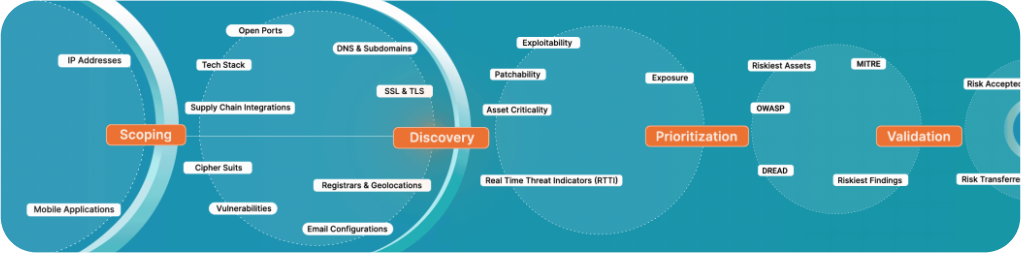
As organizations evaluate their options, modern AI-native platforms are designed to meet these exact challenges. Siemba provides an AI-driven Continuous Threat Exposure Management (CTEM) platform that delivers proactive defense across the full funnel. A core part of our platform is GenPT, an AI-driven DAST module that simulates real-world attacks, enabling automated penetration testing and finding vulnerabilities with greater speed and accuracy.
Our unified platform identifies, prioritizes, and remediates threats across your entire attack surface, while providing an AI-powered assistant for faster decision-making. The goal is to help organizations shift from reactive measures to actively hardening their security posture. Organizations leveraging Siemba often see value rapidly, with customers typically reporting Time to Value in just 24 hours. And it leads to significant operational benefits, with users seeing an average of 70% cost savings and approximately 90% time saved.

%202%20(1).svg)

-1.png?width=1072&height=767&name=banner%20(2)-1.png)















.svg)







.png?width=380&height=378&name=image%20(58).png)
 Is DAST right for me?